BaBa Blogger

Latest Post

May 06, 2020

choosing a domain name

How thoroughly should you think about your domain name? Is it really that important?

If you have a quality website and business, people will visit your site no matter what the domain is, right?

Well, not so fast…

You see, your domain name is the key element of your website. It can make or break you, so it’s crucial to choose a domain name that works for your business.

But wait, why is your domain name so important?

  1. It’s your “first impression”. Your URL is the first thing your visitors will see. A good domain name can make a positive and lasting impression, while a bad domain name can send visitors running.
  2. It affects SEO. While exact match domains (EMDs) are no longer a necessity, keywords in your domain name can still help your SEO ranking.
  3. It defines your brand. We’ll talk about this in a minute – your domain name is a branding opportunity! The right domain name can increase brand recognition.

These elements are only a few of the many reasons why your domain name is so important.

How do you choose the right domain name? That’s precisely what I’m going to share with you today.

Important factors of choosing a domain name:

  1. Use .com, .org or .net (most popular ones)
  2. Brandable over generic
  3. Shorter is better
  4. Easy to type
  5. Easy to pronounce
  6. Avoid hyphens and numbers
  7. Consider using a keyword that reflects your website
  8. Think long-term over short term
  9. Check if it’s not trademarked
  10. Use domain name generators when stuck

How to Choose the Perfect Domain Name

1. Use The Right Domain Name Extensions (.com, .org, .net)
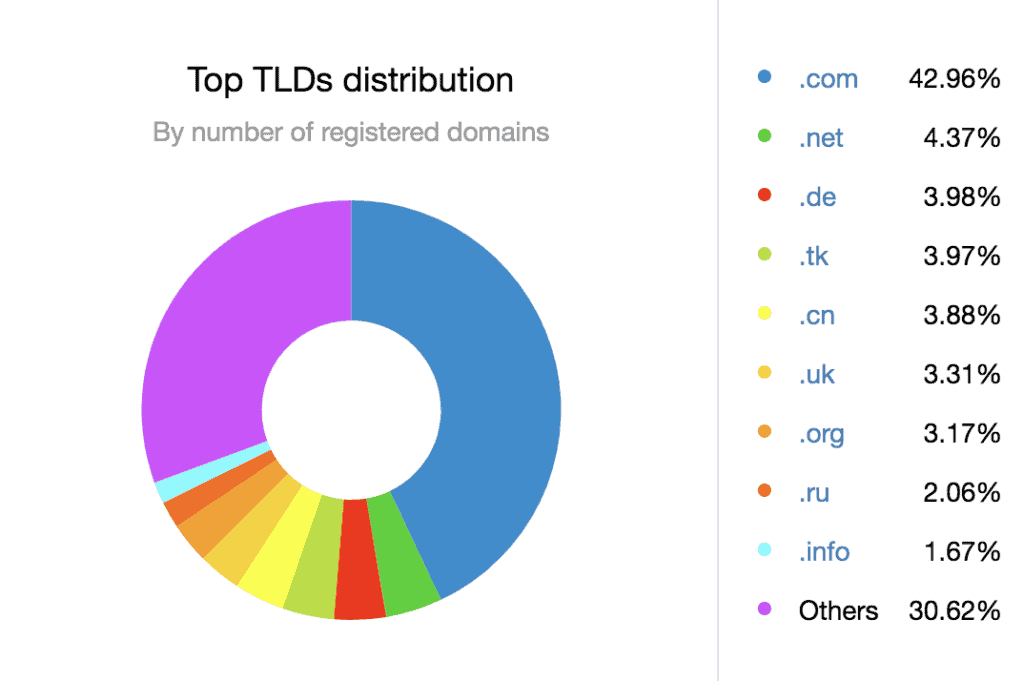
Top TLDs distribution

When you choose your domain name extension, you can be sure of one thing: “.com” is still the best.

According to research from DomainNameStat, 43% of all domains have the “.com” extension.

Why? Well, “.com” is the most familiar and easiest to remember.

While there are many successful websites with a “.net” and “.org”, your website will probably do better if it has a “.com” extension. It’s the safest bet.

My advice: Go with .com. If that’s taken, try .net or .org. If these are taken too, you’d be better off brainstorming a new domain name. And oh! – Avoid those weird extensions like “.club”, “.space”, “.pizza” and so on.

2. Brandable Over Generic

Creative and brandable are always better than generic.

Remember: Your domain name is how visitors will find, remember, and share your company on the web. It is the foundation of your brand.

Here’s the main difference between a brandable and generic domain name:

A brandable domain name is unique and stands out from the competition, while a generic domain name is usually stuffed with keywords and unmemorable.

For example, do you know the difference between Healthinsurance.net, Newhealthinsurance.com, or Healthinsurancesort.com? Probably not, right?

These are horribly generic. They don’t have any meaning. You won’t hear anyone talking about how awesome “Insurance.com” is. Variations of the word “insurance” will increase the competition and make it blend in even more.

Sites like UnitedHealthCareOnline.com and Anthem.com stand out because they stand for something. When people hear those domain names, there is a trust factor there.

Here’s how to find a more brandable domain name:

  1. Create new words. You can make up your own catchy, new words. That’s what Google, Bing, and Yahoo did.
  2. Use existing words. You can use a thesaurus to find interesting words that fit your brand.
  3. Use domain name generators. These tools can help you create a unique, brandable domain name from your initial domain ideas and keywords. (We’ll highlight some of our favorite domain name generators later in this post.)

3. Short Is Better Than Long
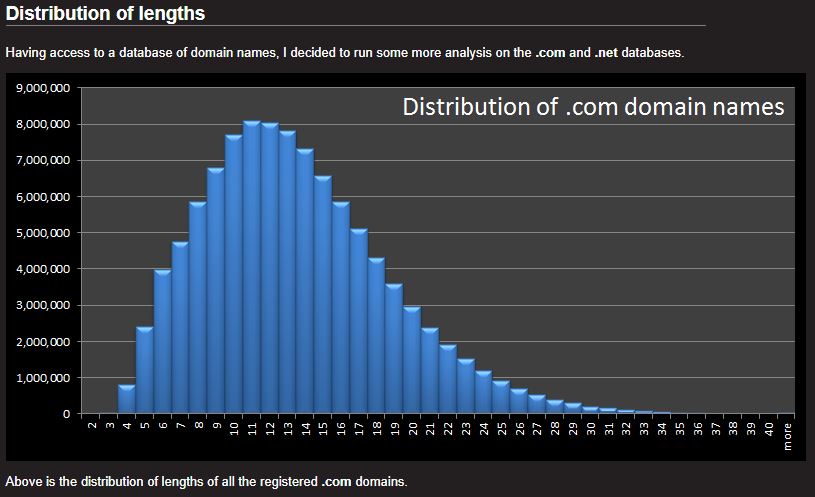
Domain name lenght distribution

Source: datagenetics.com

In general, when it comes to the length of your domain, shorter is better.

According to research from DataGenetics.com, a blog by Nick Berry, the most common name length is approximately 12 characters.

(Popularity, in this case, refers to the amount of web traffic the site receives.)

All of this data shows that you should keep your domain name concise.

Aim for 6-14 characters – and remember the shorter, the better. Most likely the shorter domain names are taken a LONG time ago and sold for thousands of dollars. If you can’t find something short, make it brandable.

My own site – websitesetup.org is exactly 12 characters.

4. Make Sure It’s Easy To Type

Think of some of the most popular websites in the world. What comes to mind?

Google, Facebook, Twitter, Instagram, Yahoo, CNN…

One big thing they have in common is that they’re all easy to spell.

Your visitors should be able to type your domain name without a problem. If you have to explain the spelling more than once for it to be understood, it’s too complicated!

The last thing you want is for the potential visitors to mistype your domain and end up on a different website!

Here’s an easy way to test this…

Tell 10 people your potential domain name and ask them to spell it. If more than a few people struggle to spell it, you need to simplify it.

5. Make Sure It’s Easy To Pronounce

As easily as your domain name rolls off the tips of your fingers, it should roll off the tip of your tongue.

This makes it easier for visitors to share your domain name by word-of-mouth and makes it easier for you to share your site with friends and potential customers.

You can test this the same way as with the “spelling”.

Write your domain name on a piece of paper and ask 10 people to pronounce it. If more than a few people struggle to pronounce it, you should simplify it.

Here’s what to keep in mind: You want your domain name to be passed along easily by you and others. The only way for that to be possible is if it’s 1) easy to spell and 2) easy to pronounce.

6. Avoid Hyphens And Numbers

Remember how your domain name should be easy to spell and pronounce? Hyphens and numbers make it more difficult.

Imagine explaining Facebook if it had a hyphen in there…

“Have you seen this new site Face-Book? There’s a hyphen in there by the way, between the ‘Face’ and the ‘Book.’”

Facebook might not have spread so quickly if that was the case.

The bottom line? Your domain name should be smooth and punchy – hyphens and numbers get in the way of that.

Stick to the letters!

7. Consider Using “Niche” Keywords That Reflect Your Website

Our website mainly about web development or helping people to create a website. Hence we chose to add a name that reflects all of it – “website”. Obviously website.com (or .org, .net) was no longer available, we simply chose “WebsiteSetup”.

Keywords can help to improve your SEO – you need to tread carefully here! If you try to awkwardly stuff keywords into your domain, it comes across as generic (like we talked about before).

If you choose to use keywords, put the keywords at the beginning of your domain. That’s where they’ll be the most powerful for your ranking.

You can find keywords with tools like Google Keyword Planner and Keywordtool.io.

8. Think Long-Term Over Short-Term

NEW IMAGE FROM TOM

Are you ready to marry your domain? You should be because it will be one of the biggest elements that define your business and brand for years.

If you decide to change the domain in the future, it will cost you money, branding, and SEO rankings. In short – it’s a huge pain!

When you’re choosing your domain, think long-term.

For example, if your company helps businesses optimize their websites for SEO, you could choose a domain name like, “OptimizedSEO.com”

If you think there’s a chance you might expand to more general digital marketing services in the future, like email marketing, PPC, etc. then it might be wise to reconsider your domain name.

You don’t want to pin yourself down to a certain niche if you think you might expand out of that niche.

Therefore, keep your long-term vision in mind when picking your domain name.

9. Check If It’s Not Trademarked Or Already Used

Before you move forward with a specific domain name, check to see if the name is available on social media sites, as well as if there are any trademarks already registered to the name.

You can check current trademarks here: https://trademarks.justia.com/

To build your brand, it’s ideal to have the same name across your domain and social networks. This builds familiarity and makes it easy for your visitors, fans, and customers to find you around the web.

Avoid legal issues; you should stay away from names that already have trademarks.

How can you quickly check social networks and trademarks for your potential domain name?

It’s quite easy with a tool like Knowem. Search your potential domain name – it’ll show you if it’s available throughout over 25 popular social networks and if there are any trademarks already registered to the name.

If it’s taken, consider tweaking it so that you can create original social media profiles.

10. Use Domain Name Generators When Stuck

At this point, you should have at least a general idea of some possible words to put in your domain. Some of those words may already be taken, trademarked, or just don’t have the “sound” you’re looking for.

That’s where domain name generators come into play. These generators can turn your ideas into fresh, available domains.

Here are some of our favorite domain name generators to try out:

  1. Wordoid. This tool allows you to plug in a word; it will come up with ideas that either contain that word, begin with that word or end with that word.
  2. Lean Domain Search. This tool matches your keyword with other keywords and generates a list of available domains.
  3. DomainHole. This tool allows you to search keywords, find expired domains, generate new names, and more.

May 05, 2020


Want to know how to start a blog in 2020?
Good decision, 
That’s the best decision I ever made in my life to start a blog,
Here is the deal;
Do you want to make passive income on autopilot through blogging, which helps you to live life like a boss? So starting a blog is the first and crucial step that leads you to success.
But, After reading this guide, you will start your blog today and make a path for your success.
Starting a blog is not complicated at all, but all you need some guidance, which helps you to start a blog in 2020.
Here are the seven easy steps to start your profitable blog without making a mistake and some bonus tips which help you to scale your new branded blog.
Let’s dive into it,
  • Step 1: Choose a Niche for Your Blog
  • Step 2: Choose a Good Domain For Your Blog
  • Step 3: Find a Good Web Hosting Provider and Domain
  • Step 4: Set Up Your WordPress Blog
  • Step 5: Choose an Attention-Grabbing Theme For Your Blog
  • Step 6: Some Essential Plugin For Your Blog
  • Step 7: Write and Publish Your First Blog Post and Make It Live
  • Bonus: Some Ways to Make Money From Your Blog

Before starting the full process for making a profitable blog,
Maybe some of you are thinking, why you should start a blog in 2020?
I always prefer to say that 2020 is the golden arena for starting a blog and grow it,
Because blogging is becoming tough day by day and if you started today, so you have more opportunities/chances, then others who will start later than you.
There are so many benefits if you start your blog and grow it, Here some Unforgettable Benefits of blogging which helps you :
  • Express Yourself – Blogging is the platform that allows you to express yourself by writing the content for your audience. 
  • You can help others and gain fans – You can help the readers by writing the content on your blog, and by this, they will become your true fans which always there for your support.
  • Make Money Online – Yes, You can make money from your blog by doing Affiliate Marketing and Running Ads.
I think you got an idea about why you started and how blogging will help you
Let’s dive in,

Step 1: Choose a Right Niche for Your Blog (Crucial Step For Success)


This is the most important part, and many newbies are stuck at this point.
Did you know? That 99% of bloggers quit blogging in starting six months because they choose the niche which they don’t passionate about.
Niche is like a topic but not a simple topic because they have several topics in it.
Choosing a niche is the fastest way to lose a game in the beginning.
Are you still confused?
Let take an example about the niches – 

Smart Passive Income – Patt Flynn started this blog named Smart Passive Income, where he shares strategies to grow your online business. Today Smart Passive Income is one of the most successful blogs which are making millions of dollars every day.
ShoutMeLoud: You all know ShoutMeLoud is one of the most significant websites which teaches about WordPress, SEO, Blogging, and Much more stuff related to blogging. 
Don’t believe? See this – 
This is the earning report of ShoutMeLoud, and you can see that they make $400+ at the beginning of there blog. This shows that choosing a profitable and interest-based niche helps your blog to scale.
There are many other blogs that I can show, but I think you got an exact idea of how niche is so essential for making a profitable blog.
Currently, there are many profitable niches in which you can start your blog, but I don't suggest you go with these niches because you don't have an interest in that, and If you start a blog on that niche, so will be bored and quit blogging for sure.
So, How you can find the perfect niche that Won’t regret later
Wait, let me tell you one Fail-Proof method to find out the profitable and interested based niche for you.
You have to focus on these two factors to find out the profitable niche for your blog.
Profitability
  • See that you can make money from that?
  • They have enough affiliate programs or not?
  • Is that niche is having a good volume of keywords or not?
Passionate
  • Are you interested in working on that niche?
  • Can you share the article of that niche?
  • Can you solve other problems with your writing on that niche?
I think now you can find the perfect niche after seeing the above part, and if you can’t figure out, then you can do this to find an ideal niche.
  • Take Paper & Pen
  • Write down your interest or which you are passionate about (Add three or more) on the list
  • Find the niche which you liked the most from the list
  • Also, find an affiliate of that niche
  • You are good to go
These are some steps to find a profitable niche for your new blog.

Step 2: Choose a Good Domain for Your Blog

Selecting the website domain is not very tough and you can easily select a perfect domain name for your new blog. If you decided your domain name so you can skip this part. 
This for you If you haven’t selected the domain name till now –
When I started my blogging career, I don’t know how to choose a premium or brandable domain for my blog, and that’s why I wasted 10+ domains because I don’t like it also they don’t look brandable.
I think you don’t make a mistake like me?
If Yes! Here are four tips which help you to find your dream domain –  
  • Keep it Short & Simple – Try to keep your domain as short, don’t make it too long because it’s not easy to pronounce and keep your domain name simply because it’s easy to remember. (Jon Morrow changed their domain name to BoostBlogTraffic to SmartBlogger, and their blog are getting millions of traffic because now his domain looks simple).
  • Use Keyword – You can use your main keyword in your domain, which helps you in SEO.
  • Don’t Use Numbers – You can’t use numbers in your domain because it’s not easy to remember the numbers
  • Always Use TLD Extension – I recommend you to use domain extension like .com because it’s for globally.
If you are still not able to figure out the domain for your blog, then you can find brandable domain name using one tool: LeanDomainSearch

Step 3: Choose a Good Hosting For Your Blog

For making a blog, you have to need web-hosting and domain,
I know you don’t know about both, but wait, let me guide you in this and tell you more about it.
Domain  Name –  The domain name is the name of the website which readers types in the browser.
Example Of Domain Name :
  1. HTTPS://(Hypertext Transfer Protocol)
  2. www (the subdomain)
  3. GuideBlogging (Domain name)
  4. .com(Top Level Domain).
Web Hosting – A web hosting is a place where all your files of your blog are stored and show your blog lives when someone tries to access that. Hosting is like the hard disk of the computer, which stored all your data (images, posts, pages, and many more) and kept your data secured.
Now, are you thinking which wordpress hosting is best for you?
There are tons of web hosting which you can use to start your new blog. But I don’t recommend to you that because they are worthless.
So instead of giving you the ton of hosting list, I recommended you to go with the siteground.
Because
Siteground is the no.1 hosting for beginners, and honestly there support and service are fantastic and very reliable; it’s also not very costly like another hosting.
So, are you excited to start your business? 
If Yes, then lets dive into it,
When I started blogging, I tried every cheap hosting but the load time is awful
Then, I came to know about Siteground hosting and after purchasing it,
The load time of my blog decreased dramatically.
But WAIT! don't take my word here, SEE THE PROOF,
BEFORE Siteground,
Siteground-Before
These results are as expected because, at that, I'm using cheap hosting.
Siteground-After
BOOM! You can see after migrating to Siteground the load time is decreased by 85%
WAIT, But don't take my word here; There are some of the latest REAL reviews about Siteground.
Syed-Balkhi

Syed Balkhi

WPBeginner
SiteGround is one of the most popular and highest rated hosting providers in the WordPress community. They provide unique in-house WordPress speed and security solutions to make your site as fast and secure as possible.

Brad Smith

HostingFacts
SiteGround has delivered reliable uptime for a few years now. And their uptime guarantee makes sure that you’ll probably never have any significant downtime issues.
So, Let's move on and,

In this part, I will guide you how you can purchase the domain and host from Siteground,

You can also choose any other hosting you want. Still, I highly recommend you to go with Siteground because it's affordable and reliable for beginners who want to do blogging like a business.
Follow these steps to purchased hosting and domain for your first blog:
1.To start your first blog.
Siteground-Pricing
Grab 70% OFF On SiteGround
I recommend you to go with a startup plan because it has more features.
2. Choose Your Favorite Domain
Pick your domain name, which is easy to understand. Let example, if you are interested in opening a food blog and you decide the blog name is food bazar so you can go with foodbazar.com.
If you haven’t chosen the domain name yet, so I suggested you read the domain section of this blog to get more ideas about it. After reading that, you got many names for your domain.
3. Fill Your Account Information
You have to fill your information for your account.
4. Enter Your Credit/Debit Card Information
You have to fill your credit/debit card details to purchased domain and hosting
5. Confirm The Conditions And Let Get Started
You have to confirm there terms and conditions, 
After that, you have to click on the check-out button. It will take a few minutes to the siteground to proceed with the details.
Wait a few minutes, then check your email for important details related to your account.
And you’re done.
Congratulations! You have successfully purchased a hosting and domain for you. You have crossed the most prominent stop on your way to start your blog.
Let move on and see how to setup your blog.

Step 4: Set up your WordPress blog

Installing WordPress is not like rocket science,
The only thing is that we have a proper guide. Here in this part, I will how you can set up your WordPress site to make it live on the web.
Firstly, you have to go to your siteground account, If you already purchased it so you can see the similar interface after login to your account:
You have to select the start of a website option to make a brand new website.
Then, you have to click on the software which you want to install your website,
Click on the WordPress software to install to your website. After that you have to fill some login details about your website:
This information is essential, so I recommend you to write your password on dairy so if you forget so you can check there,
After fill-out all the information,
Then you have to click on the big complete button to proceed with the process.
It will take a few minutes to finish setting up your WordPress website.
Now, click on the proceed button to go on customer area:
Now, click on my account button on the menu and click on the installation tab:
Now, click on the Go to Admin Panel to visit your new blog admin dashboard:
Now, you will redirect to your WordPress dashboard after that enter your login details which you choose during the installation and click on the login button:
That’s it you just complete the setup fo your first WordPress website, Remember this URL or bookmark it:
https://yourblog.com/wp-admin/
If, by chance, you forgot the URL so you can use the above URL structure to login to your dashboard (replace yourdomain.com name with your domain).

Step 5: Choose an Attention Grabbing Theme

After installing wordpress, theme and blog looks is more important if you are just starting your new blog. 
In blogging, the design of the blog matters because if you don’t have a great design, so you are losing a lot of traffic and audience. Good design helps to build more trust towards your readers.
In your WordPress inventory, there are a hell lot of free themes that are available for you, but I don’t recommend you to go with that themes because these free themes are easy to hack, and by this, you will lose you all website data.
If you are using free or nulled themes is like Architecting your own Destruction.
If you want to do blogging as a business, so invest in themes and plugins because of this the best investment on your blogging journey. I see many bloggers don’t invest in this type of thing and face many critical issues later.
So which theme is best for you?
I use GeneratePress, which is the lightest theme (under 50KB), and loads your website fast, and also I liked the design of this theme, and many pro bloggers are using it because it’s easy to design.
There are a few more themes which I can you suggest but before that let me tell you the Few things which you keep in your mind while purchasing a theme - 
  • Make sure that premium themes which you are purchasing are lightweight and easy to use.
  • Check that the theme is compatible with your latest WordPress version.
  • Always check that the theme is responsive or not
  • Support is the main thing, so try to find a theme that has excellent contact support (like Generatepress and Themeshop).
Now let me tell some of my favorite paid themes that I am currently using on my other blogs.

Some of my Favorite Themes (Personally Used)

Astra Pro – Astra Pro is lightweight and easy to customize the theme. This theme is like a generatepress, but they have a lot of features which doesn’t available in generatepress, and You can make your homepage attractive and responsive too with using elementor with that.
Focus Theme By Thrive Themes – Focus theme is the most powerful theme which has all necessary options like email opt-in, shortcodes, and many more. This theme is fully responsive and easy to customize. If you are an Affiliate Marketer so this theme is like gold for you because it’s conversion optimized. There are more features that help you to make your website more powerful.
Scheme Theme – Schema theme is crafted by mythemeshop, and the best part of this theme that’s this is search engine optimized. It’s also the fastest theme aswell.
GeneratePress – GeneratePress is the theme that I am currently using in my this blog, and for me, it’s work good so far because this theme is easy to customize so anyone newbie can customize it. The support of this theme is amazing. If I want to choose themes from all the above, I choose generatepress because of their stunning looks
After picking one theme now it’s time to install that theme on your blog.
For installing any WordPress theme on your blog just follow these below steps:
First of all, you should be login on your WordPress dashboard ➡ appearance ➡ themes
1. In the themes section, you will find various free themes, but if you already have so, click on the add new button.
2. Click on the upload theme and upload your theme zip and activate that theme on your blog. 
Finally, you installed and activate your preferred theme into your blog. Installing is a theme is an easy task, but the main and important task is to customize that theme.
So if you want to customize your theme, click on appearance ➡ customizes, and now you can able to customize your theme.
After making your theme responsive and optimized now, I will tell you some most essential plugin which almost every WordPress users install, and it’s also an important part to run your website on automation.

Step 6: Some Essential Plugins for WordPress

WordPress without plugins is nothing because plugins are necessary to (Optimize your content, for SEO, Speed, and many more). There are lots of plugins on WordPress, but there are some plugins that I am currently using and making such things on autopilot.
Want to know the list of my favorite plugin?
So, here is the list of my plugins which I am personally using almost in all my website – 
Elementor or Thrive Architect – These are the page builders for designing any page. These plugins allow you to create your dream landing page by just drag and drop. I used both, and they are very lightweight to use and helps me to create a stunning page.
Rank Mathe SEO – SEO is important to rank and drive a lot of traffic. Rank math is the new SEO plugin that becomes a favorite for every blogger now. Many bloggers suggest you go with Yoast, but I don’t recommend that because they don’t have lots of features like that. For information, you can read the review on my blog.
WP Rocket – You already know that speed is one factor to rank on google. So wp rocket is the plugin, which helps you to optimize your full website and make it faster. I strongly recommend you to buy this plugin if you are looking for an alternative to this so you can go with autoptimize. 
Thrive Leads – If you want to collect emails of your readers so you can try to thrive leads which helps you to make popup lightbox, sticky ribbon, screen filler overlay, content lock, and more.
iThemes Security – Security is the no.1 priority; many times, somebody tries to hack your website, so this plugin helps you to secure your entire website. Using the security plugin is essential to keep your blog safe.
UpdraftPlus – Backup of your website is necessary, although your siteground keeps website backup daily. But for more security, I used this plugin to backup my website daily. This plugin helps you to backup your full website, and you can restore that data whenever you need it.
Anti-Spam – Many times, someone makes spam comments on your blog. This plugin helps you that if someone comment on your blog and comment looks like spam, so this plugin automatically removes it.
Resmush.it – If you are writing an informative article which has a lot of image in it so this plugin tries to optimize your images and by this your website load fast.
Social Snap Pro – Social snap is a social sharing plugin, But I like this plugin so much because they help to drive traffic from mediums like – Facebook, Twitter, and many more platforms.
These are the top plugins which I almost used in my all website to run them properly.
I don’t recommend you to go with nulled or cracked plugins because these types of plugins are easy to hack by the hacker, and by this, you lose all your website data.

If you want to do professional blogging and make money out of it, I highly recommend you keep the investment mindset and treat your blog like a business.

If you are wondering how to install the plugin? Let me help with you that,
  1. Go to your WordPress dashboard
  2. Then go to Plugins → Add New
  3. Then upload your plugin zip file and click on the “install now” button.
  4. After installing, click on the “activate button” to install that particular plugin.
Now let move on to other topics,

Step 7: Write Your First Stunning Post and Published It

Are you wondering about writing your first blog post?
So let me help you to write your first post on your blog. First of all, I want to congrats you that you have successfully set up your WordPress blog, and now it’s time to make some posts for your new blog.
For creating a blog post, you have to go: Dashboard → Post → Add New
After that, you will land on your post, and here you can start writing your first stunning post.
Now, Let me give you some tips that help you to make your first epic post:
  • If you are confused about finding the topic of your new post, so I recommended you to do some keyword research around your niche, and by searching, you will find many awesome keywords that are easy to rank.
Pro Tip: I recommend you go with long-tail keywords because it’s easier to rank.
  •  Always tries to make an awesome title of your blog post by using numbers and power words.
  •  Make sure you should add some images for making your article more comprehensive; I strongly recommend you to make your article lengthy and more in detail, and by more detail post, you can make your reader your true fan.
  •  I suggest you go through with the on-page guide so you can optimize your content easily.
  • Use words like I and You to more connect with your readers and try to don’t take copyright images from google. I recommend you always to use copyright-free images.
I think these tips help you to create your first blog post, 
Now, Let’s move on to the favorite of every blogger.

Step 8: Some Ways to Make Money from your Blog (Bonus)

This is the bonus part for you all, where I shared some ways which help you to make money from your blog.
Before starting, let me Congrats, you because you have published your first blog post on your blog. 
Let dive into it,
There are several ways which you can use to make money from your blog. In this part, we will discuss some ideas which you can use to handsome money from your blog.
I have created a list of ways which helps you to make your first dollar online,
Are you excited enough like me? 
If Yes, then let’s move on to the list:
Affiliate Marketing: This is one of the effective methods for making money online. In this, you have to promote other products on your blog, and if you get a sale of that product so then, you will get a commission from the product owner.
Advertising on your blog: Most of the common ways ever blogger uses this to monetize their traffic and make money handsome money out of it. Many bloggers are using it and making a decent amount of money. 
Two leading websites – Adsense and Media.net, You can apply to there program and make money from there.
Offering Service: If you are an expert on anything like SEO so you can offer service to your reader, and they will directly pay you. This is one of the fastest ways to earn money from your blog.
Selling your course or product: If you know how to sell anything so you can create your path and sell to your readers, but before that, you have to build trust towards your audience if you already have an audience then you can sell them anything.
These are the ways that you can use to make money from your blog. But always remember that if you want to make money from your blog so you have to keep patience and do hard work on your blog, and you will see your massive growth.

FAQ Related To How To Start A Blog In 2020

Q.1 How much does it cost to Start a Blog?

For starting a blog it cost you around 3.50$ a month from the siteground but I recommend you to go with one year plan to get a special discount.

Q.2 How to start a blog and get paid?

In this guide, we already tell you how to start a blog in 2020 and for getting paid from your new website you can use Google Adsense, Affiliate marketing and many more earning methods.

Q.3 How to start a blog business?

For making a blog you can read this comprehensive guide and also you can make your blog for only business purposes.

Q.4 I started my blog but how can I get traffic?

Traffic works like a motivation for newbie bloggers so if you are confused about how you can get traffic, Here is a full guide about it – Increase Website Traffic Fast.

Q.5 Is starting a blog in 2020 still worth it?

Yes! and The reason why you here because you also want to start your blog in 2020 and If you are taking Blogging as a business then it’s still worth it

Q.6 Can I start a blog for free?

Yes, you can start your blog for a free using platform like Blogger but I don’t recommend you to do that because if you want to make real money from your blog so you need to understand the power of an investment. I recommend you that don’t go with free and purchased hosting and start your new blog today.
Wrapping Up and Now What Next?
Congratulation! You Have Created Your First Blog In 2020
But What Next?
This is not an end, but I think this is the beginning of your journey, and you have to learn many things like SEOAffiliate Marketing, and Many More things. 
For being a successful blogger, you have to learn many things and implement all things to your blog to see the results. I recommend you to create the habit of learning and always learn new things by reading the blog and much more stuff.
I hope you like this article, and maybe this helps you to create your new successful empire today.
I also recommend you to join our Free Blogging Community to stay updated with new stuff. I too very active in my group, so if you have any doubts, I will personally help you and clear you're every doubt.
Every single share counts for us! I appreciate your effort. 


MKRdezign

Contact Form

Name

Email *

Message *

Powered by Blogger.
Javascript DisablePlease Enable Javascript To See All Widget